Time To Go app icon — a glowing blue globe with silver clock hands

Time To Go

A small Mac menu bar app that shows you what time it is in the cities you care about. One click, every city, no math.
Free. Made with love by Lex Friedman.

If you work with people in other time zones, or you have family on the other side of an ocean, you end up doing the same arithmetic all day. Is it too late to call London? Is Melbourne awake yet? What time is it in Tucson, which doesn’t do daylight saving, in the half of the year when that matters? Time To Go does that arithmetic for you and keeps the answer one click away.

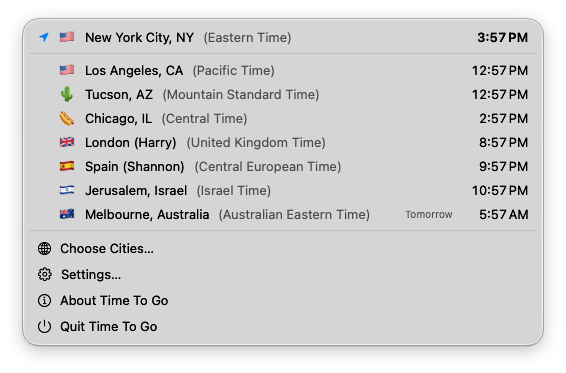
Click the icon in your menu bar and you get a list of your cities with the current time in each. Your own location sits at the top, so you always have a reference point. Each city shows its time zone by name, and if it’s already tomorrow somewhere, the list says so — handy for not calling someone at 3 AM. Give a city a flag or an emoji, or label it with the name of the person who lives there, so the list reads the way you think about it.

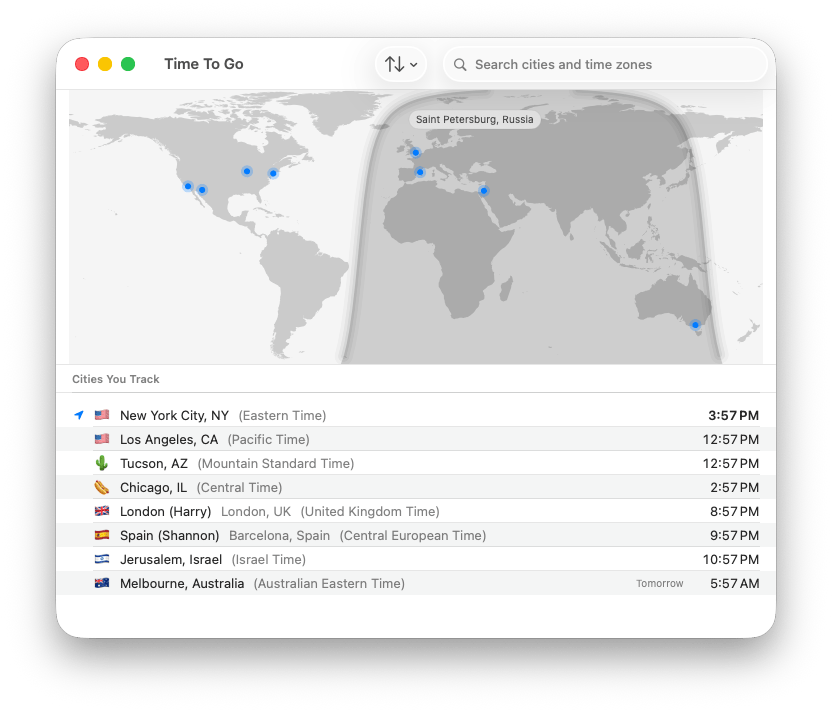
Want the bigger picture? Open the main window and you get a world map with each of your cities pinned on it, with the part of the planet currently in nighttime shaded. Search for any city or time zone to add it, and sort the list however you like.
That’s the whole app. It does one job and stays out of your way. No account, no sign-in, no subscription, nothing to unlock. It’s free, because I wanted it to exist and figured you might too.
The whole app, basically
Every city you track, with the current time. Label a city with the person who lives there, give it a flag or an emoji, and note that Melbourne is already on tomorrow.
And the map, if you want it
The Time To Go main window: a world map with blue pins on each tracked city, a hover label reading Saint Petersburg, Russia over one pin, the nighttime half of the globe shaded, a search field for cities and time zones, a sort button, and a Cities You Track list below the map showing each city’s flag, label, real city name, time zone, and current time
Your cities pinned on a map, with the dark half of the world shaded. Hover a pin to see which city it is. Search to add one, sort to taste.
Lives in your menu bar
No app to open, no browser tab to hunt for. Click the icon, see every city you track, get on with your day.
A map when you need one
The main window pins your cities on a world map and shades the part that’s currently dark, so you can see at a glance who’s asleep.
Free, no strings
No account, no subscription, no trial that expires. Download it, add your cities, and you’re done.