iPhone & iPad

Gnome
The truest thing about animated GIFs is that they are a critical pillar of modern human communication, and yet getting one into a Slack message or an iMessage thread or an email reply usually requires opening a browser, navigating to a website, searching, right-clicking, copying, switching back, pasting, and apologizing for the delay. By then the moment has passed, and the joke is dead, and what was the point of any of this, really?
Gnome lives in your Mac’s menubar. You hit a keyboard shortcut. A little search window appears. You type what you’re looking for — weird al, shrug, nailed it, that’s a paddlin’ — and a grid of GIFs appears. Click the one you want. It’s now on your clipboard. Paste it wherever you were typing. Joke saved. World improved.
That’s really the whole app. It does exactly that, and it gets out of the way. No account. No sign-in. No newsletter. Just GIFs, faster.
Oh, and: Gnome also handles your local GIF library, if you have one. Search it, tag it, organize it — the stash of GIFs you’ve been hoarding in a folder somewhere becomes actually useful. Even better: Gnome uses Apple’s built-in vision tech to analyze the frames of every animation in your library, so you can search for text that actually appears inside the GIFs themselves. Type don't call me Shirley, and there’s your Airplane GIF, no matter what you named the file.
And there’s a built-in GIF Creator, because sometimes the internet hasn’t yet produced the GIF you need. Drop in a background image, type something bold on top, throw in a flurry of animated emoji sparkles, sprinkle some confetti if the moment calls for it — then copy the finished GIF straight to your clipboard. Same paste-it-anywhere flow as everything else, except this time the GIF is one you just invented. You will become insufferable about this. That’s fine.
The app is $7 to unlock everything forever. Go ahead and grab it.
Otherwise: after five minutes of unpaid use, the app will only ever return GIFs featuring “Weird Al” Yankovic or Rick Astley. Which is, depending on your perspective, either a steep penalty or a generous gift. Your call.

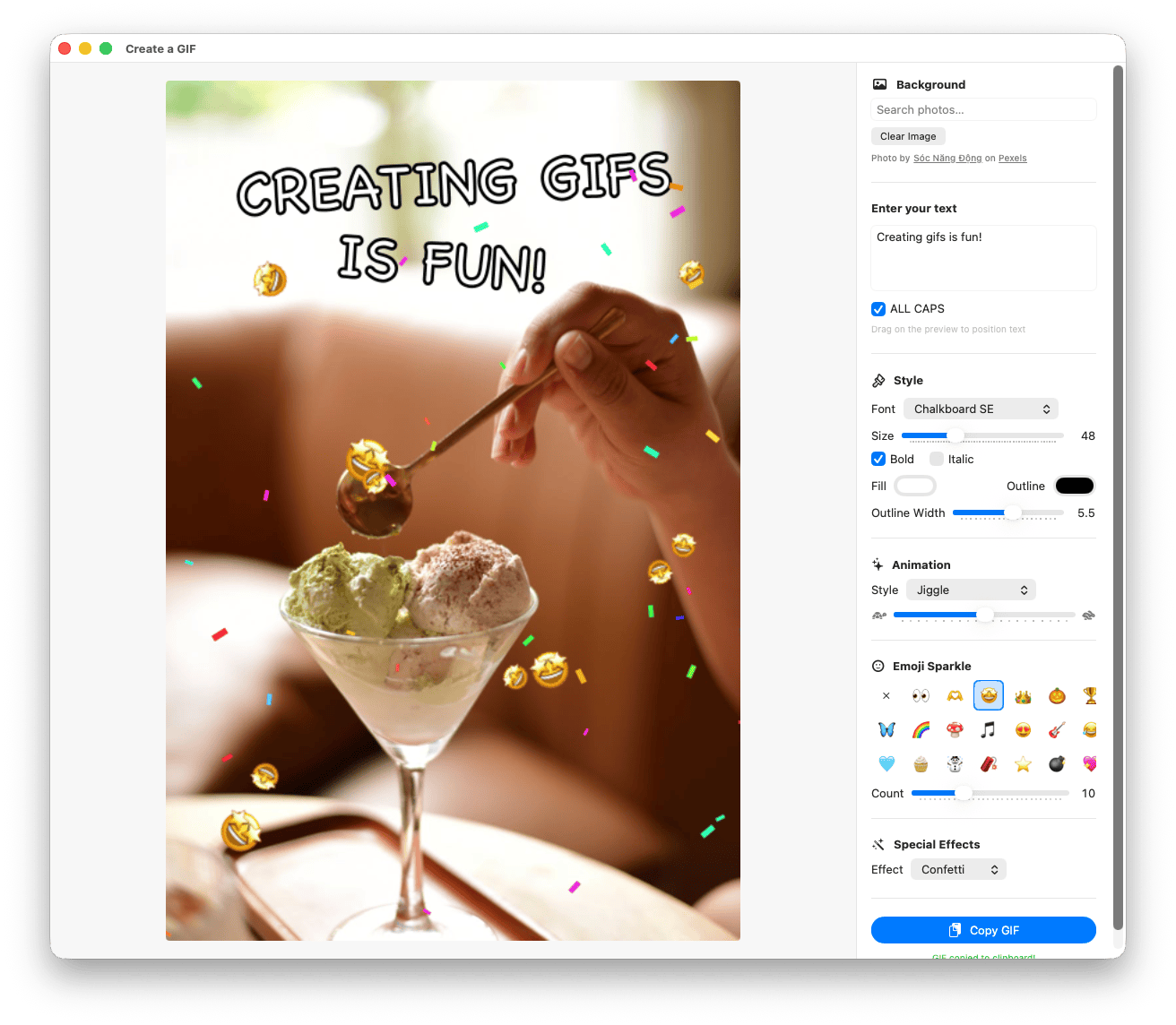

Out comes a GIF that nobody else on earth ever saw.
Gnome is properly accessible. The whole interface is keyboard-navigable, every GIF in the results is labeled with its title and caption for VoiceOver, and there are dedicated commands to copy just a GIF’s title or just its caption to your clipboard. Useful for screen reader users, and also for the times when sharing what a GIF says works better than sharing the GIF itself.