AC Slater
You have an air conditioner. You also have a Sensibo — the clever little gadget that bolts onto a regular AC and gives it an internet brain. The official Sensibo app is fine, but it is an app, on your phone, with a splash screen and animations and a network round-trip just to remember what mode you’re in. You don’t want a splash screen. You want to make the room one degree colder, and you want to do it from where your hands already are: the Mac you are already using.
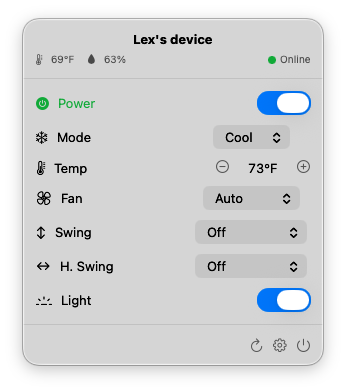
AC Slater lives in your Mac’s menu bar. Click the little remote icon and a small panel drops down with everything that matters: power, mode, temperature, fan, swing, light. Twiddle the controls, the AC obeys. Close the panel, get on with your life.
It talks to your AC through Sensibo’s public API. So whatever Sensibo can do, AC Slater can do — without making you tap through a phone app to do it.
Free to try, $6 to unlock forever. Download it, paste in your Sensibo key, and take it for a spin. When you’re ready to keep it, a single $6 payment unlocks AC Slater for good — no subscription, no recurring anything.
AC Slater talks straight to Sensibo — there is no AC Slater server in the middle. The first time you launch the app, paste in a free API key from your Sensibo account (home.sensibo.com/me/api), and that’s it. Your key stays on your Mac. I never see it. There is nothing for me to see.